I'm always excited to take on new projects and collaborate with innovative minds.

Address

Jashore, Bangladesh

Social Links

Project

Website Down Checker Robot 🤖

Get Instant Alerts When Your Website Goes Down — Using n8n as an Uptime Robot

Client

Open Source

Start Date

Dec 21, 2025
Website Down Checker Robot 🤖

Website Down Checker Robot 🤖

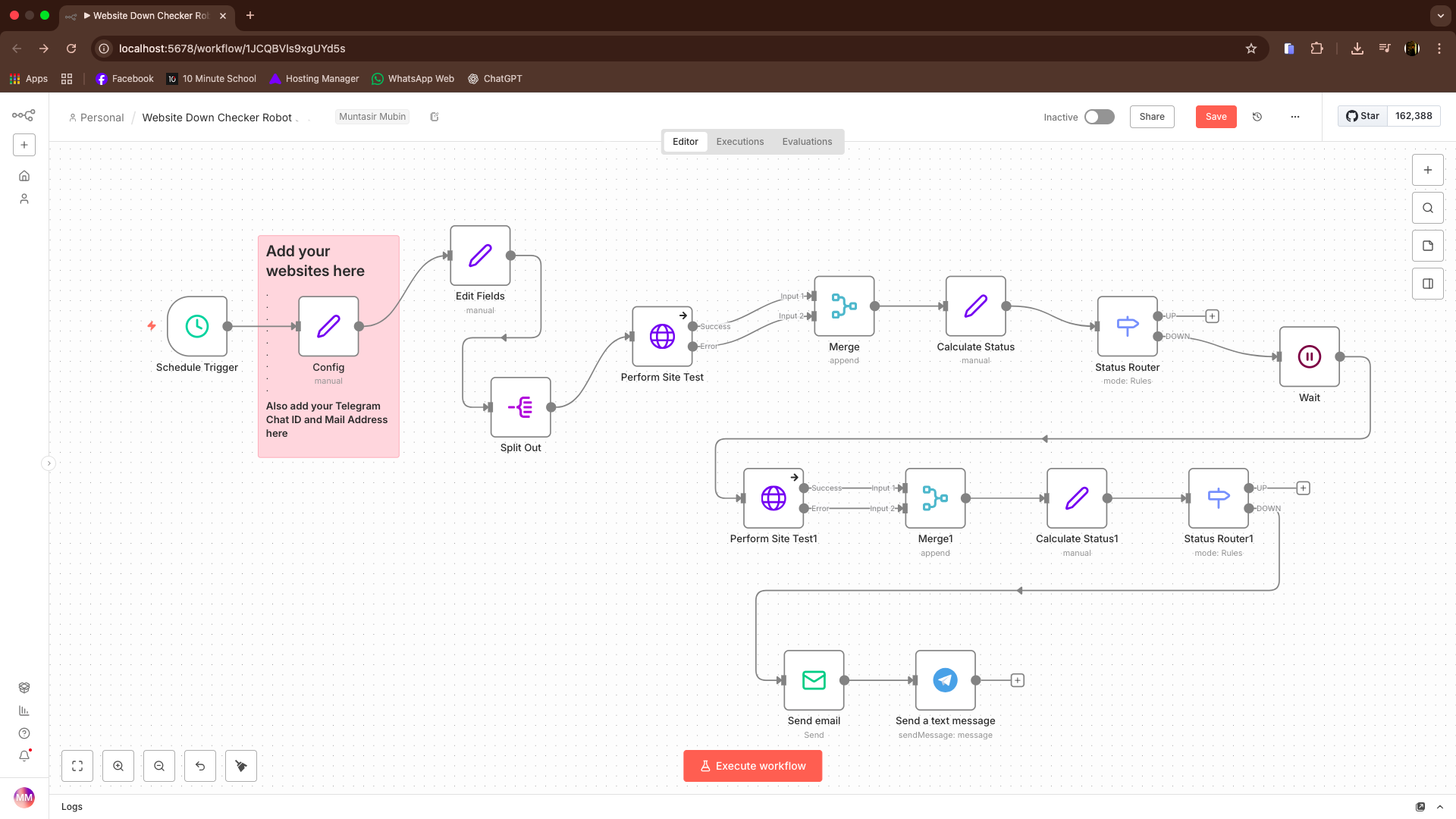
image.png

Get Instant Alerts When Your Website Goes Down — Using n8n as an Uptime Robot

If you manage websites (your own or clients’), downtime alerts are critical. But most monitoring tools create alert fatigue — emails for every tiny hiccup, even 30–60 second outages. 

This setup shows how to use n8n as a smart uptime monitor: 

✅ No extra subscriptions 

✅ No false-positive spam 

✅ Alerts only for real downtime 

✅ Optional instant phone notifications 

Why Use n8n for Website Monitoring?

Traditional tools like Uptime Robot become limiting or expensive as you scale. 

With n8n, you get: 

  • Full control over alert logic
  • Custom timing & thresholds
  • No forced notification rules
  • One tool for uptime and other automations
  • You decide when, how, and why alerts are sent 

Quick Start:

  • Free n8n Website Monitoring Workflow Get running in minutes:
  • Use the prebuilt n8n template
  • Sign up for n8n Cloud or self-host for free
  • Set your schedule (default: 5min)
  • Add the websites you want to monitor
  • Key Setting (Important) Wait time: 300 seconds (5 minutes)
  • If a site goes down, the workflow waits before alerting:

 ➡️ Short hiccups = ignored 

 ➡️ Real outages = alerted 

How to Test & Use Activate the workflow — 

  • Toggle it on; monitoring runs automatically
  • Test instantly — Add a fake or non-existent URL and run the workflow.
  • After the wait period, you’ll receive an alert Stay organized — Alerts arrive cleanly in your inbox 

(Tip: pair with an AI email labeling workflow for color-coded alerts) 

Get Critical Alerts on Your Phone (Telegram) Email is fine, but critical sites need instant mobile alerts. 

Best option: 

Telegram bots:

 Free Fast No extra APIs or subscriptions 

How It Works: 

  1. Create a Telegram bot via BotFather
  2. Add the bot token & chat ID to n8n Receive
  3. Downtime alerts instantly on your phone
  4. No missed notifications. No noise

 FAQ 

  • Can I monitor unlimited sites? 

Yes — just add more URLs. 

  • What about short downtime (seconds)? 

Filtered out by the 5-minute wait.

  •  Do I need a paid n8n plan? 

No. Self-hosting is free, and this works on free plans. 

  • Why not SMS or WhatsApp? 

Telegram is faster, simpler, and doesn’t require paid APIs. 


This workflow turns n8n into a smart, noise-free uptime robot — one that only alerts you when something actually needs attention.


Source Code: Github

🔗 Connect With Me  
   Facebook

   LinkedIn


Share

Leave a comment

Your email address will not be published. Required fields are marked *